What Should an Invoice Include? 10 Essential Elements of a Professional Invoice
A professional invoice should make three things clear: who is charging the customer, what the customer is paying for, and how much they need to pay.
Whether you are a freelancer, contractor, consultant, small business owner, or service provider, your invoice should contain enough information for the customer to understand the charge and make the payment.
So, what should an invoice include?
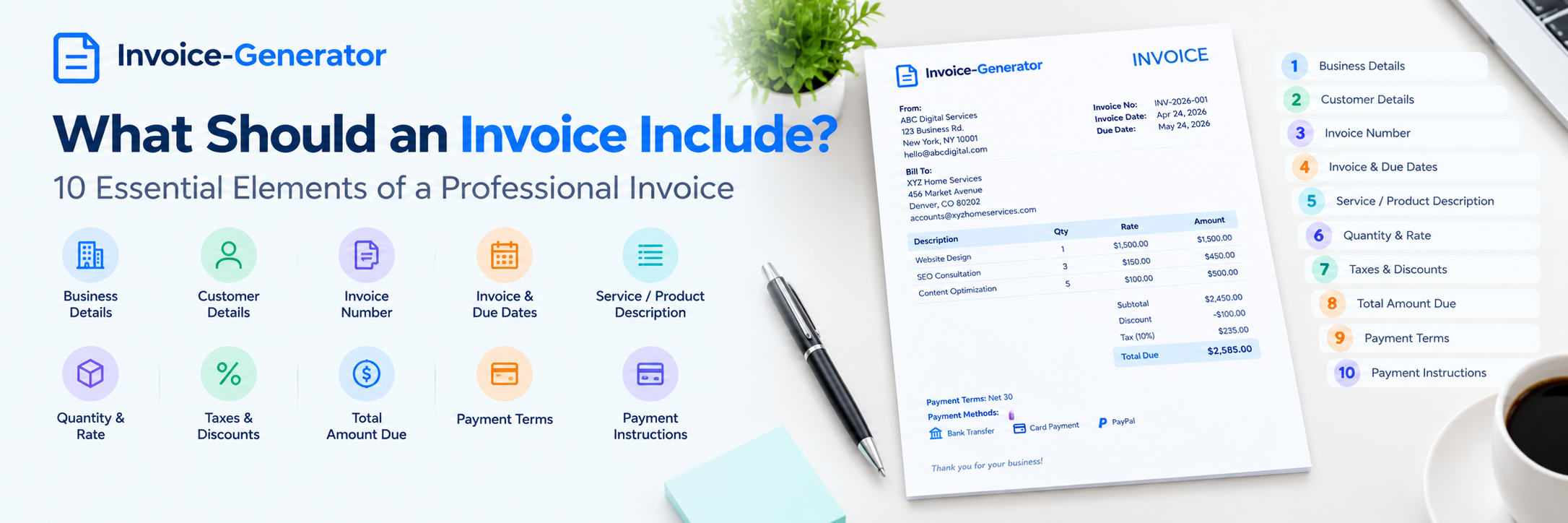
A typical professional invoice includes your business information, customer details, invoice number, invoice date, payment due date, product or service descriptions, quantities and prices, applicable taxes or discounts, total amount due, payment terms, and payment instructions.
The exact requirements can vary by country, industry, business structure, and tax situation. However, these 10 essential elements provide a practical foundation for creating a clear and professional invoice.
What Should an Invoice Include?
At a basic level, a professional invoice should include:
- Business information
- Customer information
- Invoice number
- Invoice date
- Payment due date
- Product or service description
- Quantity and price
- Taxes and discounts
- Total amount due
- Payment terms and payment instructions
Here is what each element means and why it matters.
1. Business Information
The first thing an invoice should identify is the business or person issuing it.
Include relevant information such as:
- Business name
- Business address
- Phone number
- Email address
- Website, if applicable
- Tax identification or registration details when required
For example:
ABC Web Services
123 Main Street
Austin, TX 78701
hello@example.com
(555) 123-4567
If you operate as a freelancer or independent professional, you may use your personal name, business name, or other legally appropriate information depending on your business structure and local requirements.
Why is business information important?
Your customer needs to know who issued the invoice and how to contact you if they have a question about the charge.
It also helps businesses maintain accurate financial records.
2. Customer Information
An invoice should clearly identify the customer who is being billed.
Depending on the transaction, this can include:
- Customer name
- Company name
- Billing address
- Email address
- Phone number
- Tax or business identification information when applicable
For example:
Bill To:
XYZ Home Services
456 Market Avenue
Denver, CO 80202
accounts@xyzhomeservices.com
For business customers, make sure you use the correct company name and billing information.
Why does customer information matter?
The customer may need the invoice for their own accounting records. Incorrect or incomplete billing information can also delay invoice processing.
3. Invoice Number
Every invoice should have a unique invoice number.
An invoice number is an identifier that helps you and your customer keep track of a specific invoice.
You can use a simple sequence:
- INV-001
- INV-002
- INV-003
Or a year-based system:
- INV-2026-001
- INV-2026-002
- INV-2026-003
The exact numbering format is up to you, unless a particular law, accounting system, or business process requires something different.
Why do invoices need invoice numbers?
A unique invoice number makes it easier to:
- Find a specific invoice
- Track outstanding payments
- Match payments to invoices
- Organize financial records
- Discuss an invoice with a customer
Avoid using the same invoice number for two different invoices.
4. Invoice Date
The invoice date tells the customer when the invoice was issued.
For example:
Invoice Date: September 15, 2026
The invoice date can also be important when determining payment deadlines.
For example, if your agreed payment terms are Net 30, the due date is generally based on the applicable invoice date and payment agreement.
Should an invoice have a date?
Yes. An invoice should normally include the date it was issued.
The exact invoicing and tax requirements depend on the applicable jurisdiction and transaction.
5. Payment Due Date
The due date tells the customer when payment is expected.
For example:
Due Date: October 15, 2026
You may also use payment terms such as:
- Due on receipt
- Net 15
- Net 30
- Net 60
If you and your customer agreed that payment is due within 30 days, the invoice should clearly show the applicable due date or payment terms.
Why should an invoice include a due date?
A clear due date removes uncertainty.
The customer does not have to contact you to ask:
“When is this invoice due?”
It also gives you a clear reference point when following up on an unpaid invoice.
6. Product or Service Description
An invoice should explain exactly what the customer is being charged for.
Avoid descriptions that are too vague.
Instead of:
Consulting Services — $1,000
you could write:
Business strategy consultation — 5 hours
Or:
Website SEO audit and optimization — 5 pages
The level of detail should be appropriate for the transaction.
What should a service description on an invoice include?
Depending on the work, you may include:
- Service name
- Project name
- Work completed
- Date or period of service
- Hours worked
- Deliverables
- Milestone or phase
For products, you might include:
- Product name
- Product code or SKU
- Quantity
- Unit price
A clear description helps the customer understand what they are paying for.
7. Quantity and Price
If you are charging for multiple products, hours, units, or services, show the quantity and price.
A simple invoice table might look like this:
| Description | Quantity | Rate | Amount |
|---|---|---|---|
| Website design | 1 | $1,500 | $1,500 |
| SEO consultation | 3 hours | $150 | $450 |
| Content optimization | 5 pages | $100 | $500 |
This gives the customer a clear breakdown of the charges.
What is the difference between rate and amount?
The rate is the price for one unit, hour, item, or service.
The amount is the rate multiplied by the quantity.
For example:
5 hours × $100 per hour = $500
Showing this calculation can make the invoice easier to review.
8. Taxes and Discounts
If applicable, your invoice should show taxes and discounts clearly.
For example:
Subtotal: $2,450
Discount: -$100
Tax: $188
Total: $2,538
The specific tax you need to charge depends on factors such as:
- Where your business is located
- Where your customer is located
- What you are selling
- Whether you are registered for the applicable tax
- The type of transaction
Different countries and regions have different invoicing and tax rules.
Do not copy tax information from another business simply because its invoice looks similar to yours.
Should tax be shown separately on an invoice?
If applicable, showing the tax separately usually makes the invoice easier for the customer to understand and may be necessary under the rules that apply to the transaction.
For country-specific requirements, always verify the current rules for your jurisdiction.
9. Total Amount Due
The invoice should clearly show the final amount the customer needs to pay.
A basic calculation might look like:
Subtotal − Discount + Tax + Additional Charges = Total
For example:
| Amount | |
|---|---|
| Subtotal | $2,450 |
| Discount | -$100 |
| Tax | $188 |
| Total Due | $2,538 |
The total should be visually easy to find.
A customer should not need to calculate several numbers themselves to figure out how much they owe.
10. Payment Terms and Payment Instructions
The final essential element is telling the customer when and how to pay.
Payment terms explain when payment is expected.
Payment instructions explain how the customer can make the payment.
You might include:
Payment Terms: Net 30
Payment Method: Bank transfer
Payment Instructions: Please use invoice INV-2026-001 as the payment reference.
If you accept online payments, you can also provide an appropriate payment link or other instructions.
Why are payment instructions important?
A clear payment process reduces unnecessary back-and-forth.
The customer should be able to answer two questions immediately:
How much do I owe?
How do I pay?
Professional Invoice Example
Here is a simple example showing how these elements can come together.
ABC Digital Services
123 Main Street
Austin, TX 78701
hello@abcdigital.com
(555) 123-4567
Invoice
Invoice Number: INV-2026-001
Invoice Date: September 15, 2026
Due Date: October 15, 2026
Bill To
XYZ Home Services
456 Market Avenue
Denver, CO 80202
accounts@xyzhomeservices.com
Services
| Description | Qty. | Rate | Amount |
|---|---|---|---|
| Website SEO audit | 1 | $500 | $500 |
| On-page optimization | 5 pages | $150 | $750 |
| Local SEO setup | 1 | $350 | $350 |
Subtotal: $1,600
Discount: $100
Tax: Applicable tax
Total Due: Calculated total
Payment Terms: Net 30
Payment Instructions: Pay by bank transfer or through the provided online payment option.
This example is intentionally simple. The information you need to include may be different depending on your business and location.
What Information Is Required on an Invoice?
There is no single worldwide invoice format that applies to every business.
Invoice requirements can differ based on:
- Country
- State or province
- Business structure
- Industry
- Tax registration
- Type of customer
- Type of product or service
- Domestic or international transaction
However, most professional invoices should clearly identify the seller and customer, describe the transaction, show the amount due, and provide relevant payment information.
If you need an invoice for tax or regulatory purposes, check the requirements that apply to your specific location and transaction.
What Should a Small Business Invoice Include?
A small business invoice should contain enough information for the customer to understand and pay the bill.
A practical small business invoice checklist includes:
- Business name and contact information
- Customer name and billing information
- Unique invoice number
- Invoice date
- Payment due date
- Product or service description
- Quantity and price
- Subtotal
- Applicable taxes
- Discounts, if any
- Total amount due
- Payment terms
- Payment instructions
For a small business, the invoice does not need to be complicated. Clear information is more important than elaborate design.
What Should a Freelancer Invoice Include?
Freelancers often invoice clients for hourly work, fixed-price projects, retainers, or milestones.
A freelancer invoice can include:
- Freelancer or business name
- Client name
- Invoice number
- Invoice date
- Due date
- Project name
- Description of work
- Hours or project quantity
- Hourly rate or project price
- Applicable taxes
- Total amount
- Payment terms
- Payment instructions
For hourly work, clearly show the number of hours and hourly rate.
For fixed projects, identify the project or deliverable being billed.
What Makes an Invoice Professional?
A professional invoice does not need a complicated design.
It should be:
Clear
The customer should understand the invoice without needing an explanation.
Accurate
Names, dates, quantities, prices, taxes, and totals should be correct.
Consistent
Use the same business information and invoice numbering system across your invoices.
Easy to Read
Use clear headings, spacing, and line items.
Easy to Pay
Give the customer straightforward payment instructions.
Complete
Include the information needed for the transaction and any applicable legal or tax requirements.
What Should You Not Put on an Invoice?
Not every piece of business information belongs on an invoice.
Avoid adding unnecessary content that makes the invoice harder to understand.
For example, you generally do not need to fill the invoice with:
- Long marketing messages
- Unrelated company information
- Excessive graphics
- Unnecessary product descriptions
- Irrelevant terms
- Information unrelated to the transaction
The invoice should remain focused on the transaction and payment.
Invoice Checklist Before You Send It
Before sending an invoice, take a quick look at these details:
Business details
-
Business name is correct
-
Contact information is correct
Customer details
-
Customer name is correct
-
Billing information is correct
Invoice details
-
Invoice number is unique
-
Invoice date is correct
-
Due date is correct
Charges
-
Products or services are clearly described
-
Quantities are correct
-
Rates are correct
-
Discounts are correct
-
Applicable taxes are correct
-
Total is correct
Payment
-
Payment terms are included
-
Payment instructions are clear
A one-minute review can prevent many avoidable invoicing problems.
Can I Create a Professional Invoice Without Accounting Software?
Yes.
A basic professional invoice can be created using an online invoice generator, spreadsheet, document template, or accounting platform.
For freelancers and small businesses with straightforward billing needs, an online invoice generator can be a convenient option because you can enter the necessary information into a ready-made format instead of designing an invoice from scratch.
As your business grows, you may need additional tools for:
- Payment tracking
- Recurring billing
- Expense management
- Bookkeeping
- Financial reporting
- Customer management
Choose the simplest invoicing system that meets your current needs.
How to Create an Invoice With the Right Information
Once you know what an invoice should include, creating one is straightforward.
Start with your business information and the customer's details.
Then:
- Assign a unique invoice number.
- Add the invoice date.
- Add the payment due date.
- List the products or services.
- Enter quantities and rates.
- Apply applicable discounts.
- Add applicable taxes.
- Calculate the total.
- Add payment terms.
- Provide payment instructions.
- Review the invoice.
- Send it to the customer.
Using an online invoice generator can make this process faster because the basic invoice structure is already prepared.
Frequently Asked Questions About Invoice Requirements
What are the 10 essential elements of an invoice?
The 10 essential elements are business information, customer information, invoice number, invoice date, payment due date, product or service description, quantity and price, taxes and discounts, total amount due, and payment terms with payment instructions.
What information should be on an invoice?
A professional invoice should identify the seller and customer, provide a unique invoice number and dates, describe the products or services, show the amounts and applicable taxes, state the total due, and explain payment terms and instructions.
Does an invoice need an invoice number?
A unique invoice number is strongly recommended because it helps businesses organize invoices, track payments, and identify individual transactions.
Does an invoice need a due date?
A due date is useful because it tells the customer when payment is expected. If specific payment terms have been agreed upon, the invoice should clearly communicate them.
Does an invoice need a business address?
Whether a physical address or other specific business details are legally required depends on the applicable jurisdiction and transaction. Including relevant business contact information makes it easier for customers to identify and contact the seller.
What should a service invoice include?
A service invoice should identify the service provider and customer, invoice number, dates, description of the work, quantity or hours where relevant, rate, applicable taxes or discounts, total amount, payment terms, and payment instructions.
What should a freelance invoice include?
A freelance invoice should include the freelancer's information, client's information, invoice number, invoice and due dates, project or service description, hours or project amount, rate, applicable taxes, total, and payment instructions.
Can I create an invoice without a business?
Individuals who provide freelance or independent services may be able to issue invoices, but the legal and tax requirements depend on their circumstances and jurisdiction.
Can I create an invoice for free?
Yes. Basic invoices can be created using free online invoice generators, templates, spreadsheets, or document tools. The available features vary between tools.
What is the difference between an invoice and a receipt?
An invoice generally requests payment for products or services. A receipt generally confirms that payment has been received. They serve different purposes in a transaction.
Create a Professional Invoice Online
A professional invoice does not have to be complicated.
The most important thing is to provide the information your customer needs: who issued the invoice, who is being billed, what was purchased or provided, how much is due, when payment is expected, and how to pay.
If you are creating invoices manually, an online invoice generator can save time by giving you a ready-to-use structure.
With Invoice-Generator, you can create a professional invoice online, add your billing information, enter your products or services, calculate the amount due, and prepare the invoice for your customer.
Keep your invoices clear, accurate, consistent, and easy to pay. That is what makes an invoice professional.
Ready to send your next invoice?
Free, no sign-up, print-ready PDF in under a minute.