How to Invoice for a Project: Deposits, Milestones, and Final Payments
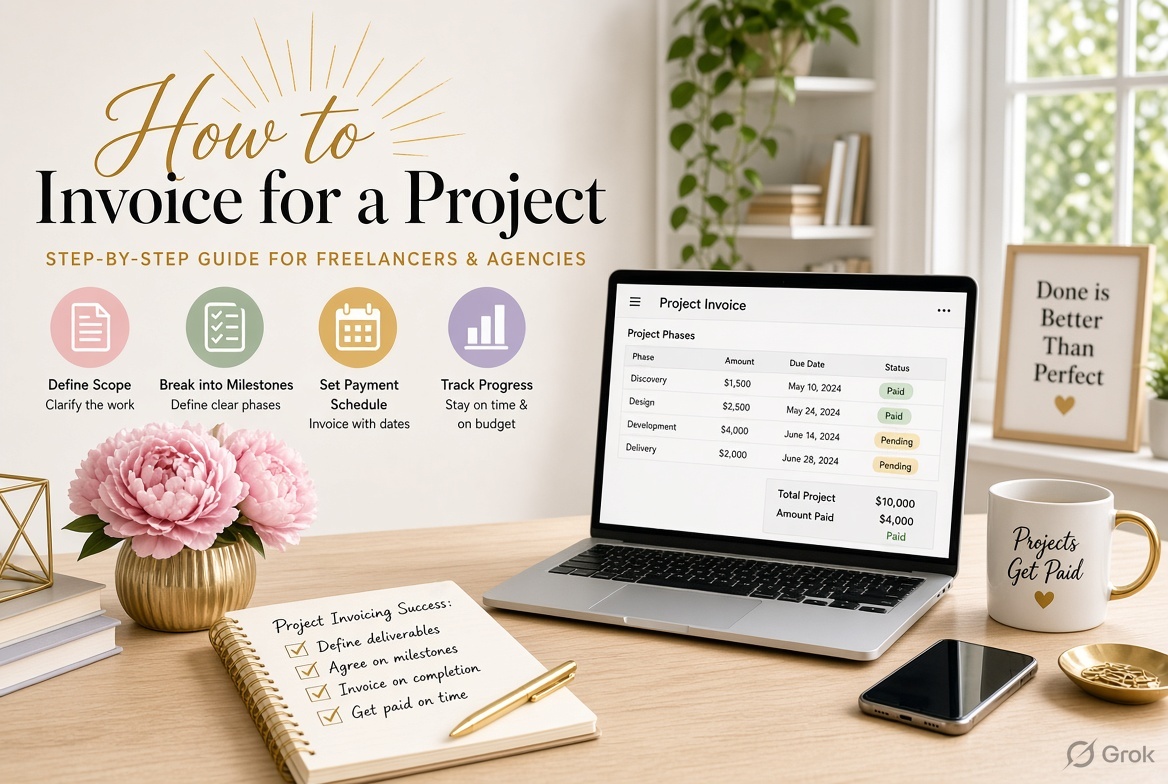
When you take on a project, you need a clear plan for when to invoice the client and how much to charge at each stage. Waiting until the entire project is finished can put pressure on your cash flow, especially when the work takes several weeks or months.
The best approach is to agree on a billing schedule before work begins. Depending on the project, you can request an upfront deposit, invoice at specific milestones, bill for progress, or collect the remaining balance at completion.
This guide explains how to invoice for a project with practical examples and a copyable billing schedule.
1. Choose the Right Project Billing Method
The billing method should match the project scope, duration, and agreement with your client.
| Billing method | How it works | Best suited for |
|---|---|---|
| Deposit | The client pays an agreed amount before work begins. | Design projects, consulting, custom development |
| Milestone billing | You invoice when an agreed stage is completed. | Website development, renovations, agency projects |
| Progress billing | You invoice periodically for work completed or progress achieved. | Long-term projects and construction |
| Final payment | You invoice the remaining balance after the agreed completion point. | Projects with staged payments or a deposit |
For a short project, one upfront payment and one final payment may be sufficient. For a larger project, milestone or progress billing can spread payments across the work.
Agree on the amounts, billing dates or milestones, approval requirements, and payment terms in writing before starting.
2. How to Invoice a Project Deposit
A deposit is an initial payment collected before or at the beginning of a project. It can help cover early work and confirm the client's commitment.
For example, suppose you agree to build a business website for $4,000, with a 30% deposit.
| Item | Amount |
|---|---|
| Total project price | $4,000 |
| Deposit percentage | 30% |
| Deposit invoice | $1,200 |
| Remaining balance | $2,800 |
Your deposit invoice should identify the project, state that the charge is a deposit, and explain how it relates to the agreed total project price.
Example invoice description:
Website development project deposit, representing 30% of the agreed project fee of $4,000.
Make sure your agreement explains whether the deposit is refundable, when work begins, and how the payment will be applied to the final project price. Refundability and any restrictions must comply with applicable law.
3. How to Invoice for Project Milestones
Milestone billing divides the project price into payments linked to defined stages of work. Each invoice covers a particular milestone rather than charging the client the full project amount repeatedly.
For example, a software development project worth $10,000 might use this schedule:
| Project milestone | Payment share | Invoice amount |
|---|---|---|
| Project kickoff | 20% | $2,000 |
| Design approval | 30% | $3,000 |
| Development completion | 30% | $3,000 |
| Final delivery | 20% | $2,000 |
| Total | 100% | $10,000 |
When a milestone is completed, issue an invoice that identifies the milestone and its agreed payment amount.
Include:
-
The project name or reference
-
The specific milestone being billed
-
The agreed milestone amount
-
Any applicable taxes or approved adjustments
-
The invoice date and payment due date
Define milestone acceptance in the contract. For example, specify whether a design milestone is complete when the design is submitted, when the client approves it, or when a particular revision is delivered.
This prevents disagreements about when an invoice can be issued.
4. How to Use Progress Billing for Longer Projects
Progress billing is useful when a project continues over an extended period and the work does not fit neatly into a few distinct milestones.
Instead of waiting until the end, you invoice at agreed intervals or based on measurable progress.
For example, a contractor working on a $20,000 project might bill in four stages:
| Billing stage | Amount |
|---|---|
| Initial agreed payment | $5,000 |
| First progress invoice | $5,000 |
| Second progress invoice | $5,000 |
| Final progress or completion invoice | $5,000 |
| Total | $20,000 |
These amounts are illustrative. Actual progress invoices should reflect the contract, completed work, approved changes, and any required supporting documentation.
For progress billing, record:
-
The billing period or stage
-
Work completed during that period
-
The amount being billed
-
Previously invoiced amounts, where relevant
-
Any approved variations or adjustments
-
The remaining contract balance, if useful
For construction or other regulated projects, additional requirements may apply to progress claims, supporting documents, retainage, and payment deadlines.
5. How to Invoice the Final Project Payment
The final invoice requests the remaining amount due under the project agreement. It should account for deposits and previous milestone or progress payments so the client is not charged twice.
Consider this example for a $6,000 design project.
| Item | Amount |
|---|---|
| Agreed project price | $6,000 |
| Deposit already paid | −$1,500 |
| Milestone payment already paid | −$2,500 |
| Remaining project balance | $2,000 |
The final invoice should clearly state that it covers the remaining balance.
Example invoice description:
Final payment for the approved website design project, reflecting the agreed project fee of $6,000 and payments previously received. Remaining balance: $2,000.
Before sending it, confirm that all previous payments have been recorded and that any approved changes, additional work, or credits have been accounted for.
If the agreement requires final approval, delivery, or handover before the final payment becomes due, follow those terms.
6. What to Include on a Project Invoice
Keep project invoices specific enough for the client to understand what they are paying for.
Include:
-
Your business name and contact details
-
The client's billing information
-
A unique invoice number
-
Invoice date and payment due date
-
Project name or reference number
-
Billing stage, such as deposit, milestone, progress, or final payment
-
Description of the work or milestone
-
Amount being billed
-
Applicable taxes and approved adjustments
-
Previous payments or credits, where relevant
-
Total amount due and payment instructions
If the invoice covers only one milestone, state that clearly. If it is a final invoice, show the calculation that leads to the remaining balance.
For more detail, see What Should an Invoice Include?.
7. Copyable Project Invoice Template
Use this template as a starting point for a deposit, milestone, progress, or final invoice.
PROJECT INVOICE
From: [Your Business Name]
Bill To: [Client Name or Company]
Invoice Number: [INV-2026-001]
Invoice Date: [YYYY-MM-DD]
Due Date: [YYYY-MM-DD]
Project Name: [Project Name]
Billing Stage: [Deposit / Milestone / Progress / Final Payment]
| Description | Amount |
|---|---|
| [Agreed work or milestone] | [Amount] |
| [Approved additional work, if applicable] | [Amount] |
| Subtotal | [Amount] |
| Applicable tax | [Amount] |
| Previous payments or credits, if applicable | −[Amount] |
| Total amount due | [Amount] |
Payment Terms: [Agreed Payment Terms]
Payment Instructions: [Accepted Payment Method]
Notes: [Milestone details, billing period, or project reference]
Adjust the template to reflect the agreed billing method. For a deposit invoice, identify the deposit and total project price. For a final invoice, show previous payments and the remaining balance clearly.
8. Common Project Invoicing Mistakes to Avoid
Waiting until the project ends: For long projects, this can delay payment for work already completed. Agree on a billing schedule before starting.
Using vague milestones: Terms such as “phase two” are not enough if the client cannot tell what work has been completed. Define each milestone in the agreement.
Charging the full project price on every invoice: Each invoice should reflect the amount due at that stage, not repeat the total contract price as a new charge.
Forgetting deposits and previous payments: Record payments and credits so the final invoice shows the correct outstanding balance.
Adding unapproved work: Get agreement on scope changes and additional fees before billing them.
Leaving payment terms unclear: State the due date and follow the terms agreed with the client.
For help setting payment deadlines, read Invoice Payment Terms Explained: Net 15, Net 30, Due on Receipt, and More.
9. Create Your Project Invoice Online
Once you have agreed on the project price and billing schedule, preparing each invoice becomes straightforward. Enter the correct client details, identify the project and billing stage, add the amount due, and check the payment terms.
You can use the free online invoice generator to create an invoice without signing up. Keep a copy of each invoice and record payments so you can calculate the remaining balance accurately.
For a broader walkthrough of the invoice creation process, see How to Create an Invoice: A Complete Guide for Small Businesses.
Final Thoughts
A reliable project invoicing process starts with a written agreement that explains the total price, billing schedule, milestones, and payment deadlines.
Use deposits to collect agreed upfront payments, milestone invoices for defined stages, progress billing for longer projects, and a final invoice to collect the remaining balance. Record every invoice and payment so the outstanding amount is always clear.
A little planning before the project begins can make billing easier for you and more predictable for your client.
Ready to send your next invoice?
Free, no sign-up, print-ready PDF in under a minute.