Invoice
Invoice Template for Web Developers: Examples and What to Include
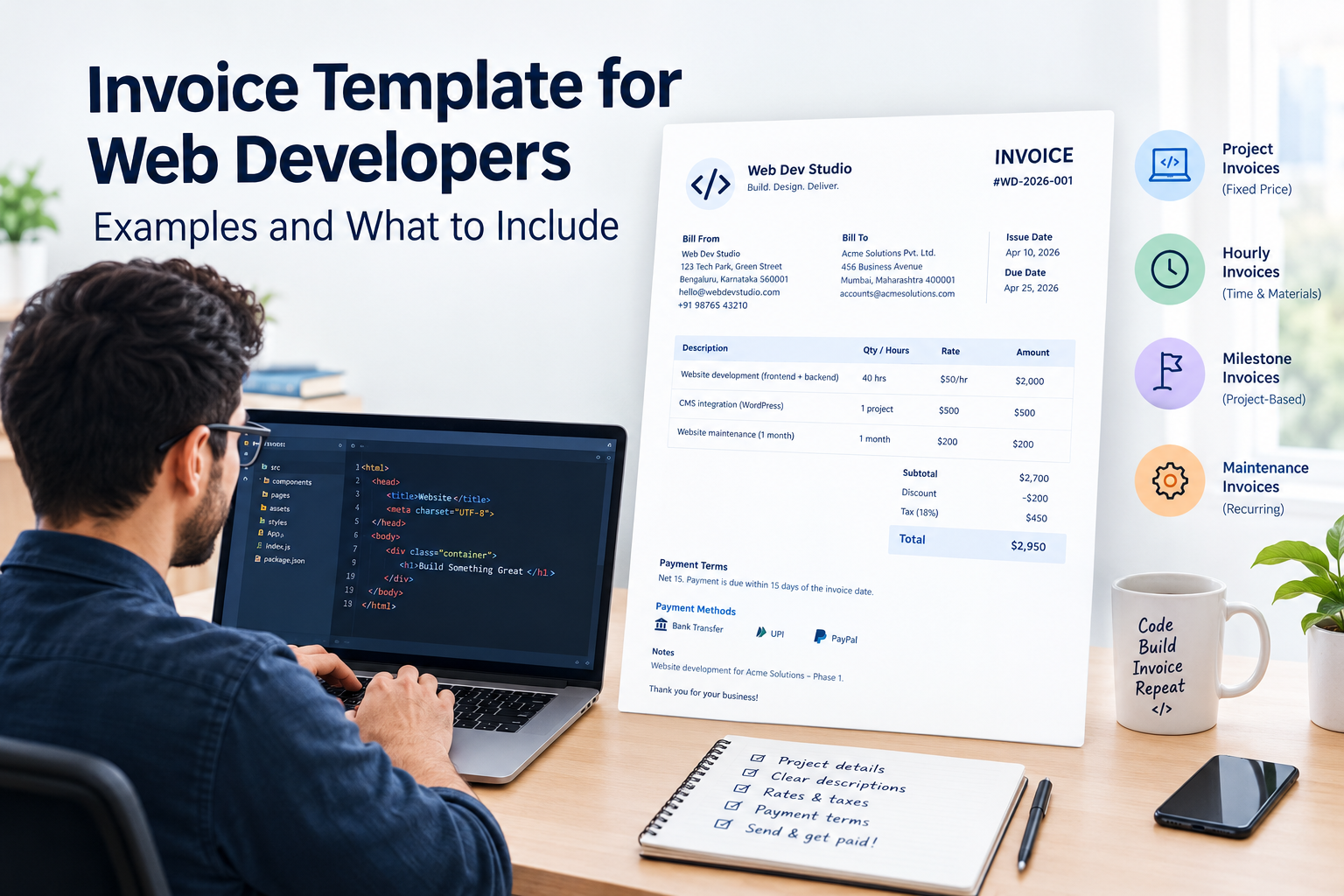
Web development work rarely follows one billing model. You might charge for building a new website, bill by the hour for bug fixes, collect payments at project milestones, or provide monthly website maintenance. Each situation needs a clear invoice that explains the work completed, the amount due, and when payment is expected.
An invoice template for web developers helps you organize these details into a professional document without creating a new invoice from scratch every time. Whether you work as a freelance web developer or run a development agency, a consistent invoicing process makes it easier to track payments and manage client relationships.
If you are new to invoicing, start with our guide on how to create an invoice. Once your invoice is ready, you can use Invoice-Generator.in to create and download a PDF for your client.
What Is a Web Developer Invoice Template?
A web developer invoice template is a reusable document for billing clients for website design and development, coding, integrations, troubleshooting, hosting-related work, and other development services.
It provides a structured place for your business details, client information, project description, rates, taxes, payment terms, and total amount due. Our guide to the essential elements of a professional invoice explains the information an invoice should contain.
A web developer invoice can be used for:
-
New website development projects
-
Website redesigns and landing pages
-
Front-end and back-end development
-
WordPress development and customization
-
E-commerce website development
-
API integrations and database work
-
Bug fixes and technical support
-
Website updates and ongoing maintenance
-
Hourly development and consulting
The right format depends on how you charge the client and what your agreement covers.
What Should a Web Developer Invoice Include?
A professional invoice should make it clear who is billing, which services were provided, and how much the client needs to pay.
1. Your business information
Add your name or business name, address, email address, and phone number where appropriate. Include your logo if you use one.
If you operate a registered business, include relevant registration or tax details when required. For more guidance on invoice structure, refer to our article about what to include in an invoice.
2. Client information
Include the client's name or company name and their billing address. Adding the client's accounts payable email or purchase order reference can help larger organizations process your invoice.
3. Invoice number and date
Assign each invoice a unique identifier, such as WD-2026-001, and add the issue date and payment deadline. Follow a consistent numbering system with the help of our guide on how to number invoices.
4. Project or service description
Describe the work clearly instead of writing only "website development."
For example:
-
Responsive landing page development
-
WordPress theme customization
-
Payment gateway integration
-
Website speed optimization
-
Bug fixes and browser compatibility testing
-
Monthly security updates and backups
Specific descriptions help clients understand what they are paying for and make it easier to review invoices later.
5. Quantity, hours, and rates
Show how you calculated each charge. Depending on your pricing model, this could be the number of hours worked, a fixed project fee, a milestone amount, or a monthly maintenance charge.
| Description | Quantity | Rate | Amount |
|---|---|---|---|
| Front-end development | 12 hours | $50/hour | $600 |
| API integration | 1 project | $250 | $250 |
| Subtotal | $850 |
These figures are illustrative. Use the rates agreed upon with your client.
6. Taxes, discounts, and total
Show the subtotal, any agreed discount, applicable taxes, and final amount due separately.
Tax requirements vary by country and business circumstances. If you invoice Indian clients, check whether GST registration and GST invoice requirements apply to your business before issuing the invoice.
7. Payment terms and methods
State when payment is due, such as within 15 or 30 days, if that matches your agreement. Include the payment methods you accept and any relevant payment instructions.
If you need help selecting appropriate terms, see our guide to invoice payment terms, including Net 15, Net 30, and due on receipt.
8. Notes and supporting references
Add the project name, contract reference, purchase order number, or a short note about the work delivered if needed.
Keep the invoice focused on billing. Detailed technical specifications, change requests, and delivery documentation can remain in the project agreement or a separate report.
Web Development Invoice Examples
Different projects need different billing approaches. Here are four practical examples you can adapt to your own work.
Example 1: Website development project invoice
Use a project-based invoice when you have agreed on a fixed price for building a website.
Sample project: Business website development
| Description | Amount |
|---|---|
| Website planning and setup | $300 |
| Front-end development | $900 |
| CMS integration | $500 |
| Testing and launch support | $300 |
| Subtotal | $2,000 |
This example assumes the listed work is included in the agreed project scope. Applicable taxes, previous payments, and any remaining balance should be shown separately where relevant.
For larger projects, you may invoice the client in stages rather than charging the entire project fee at once. Our guide to recurring invoices is useful if you also provide ongoing, scheduled services, although recurring billing is different from milestone billing.
Example 2: Freelance web developer invoice
A freelance web developer invoice is useful when you work independently for multiple clients or provide development services under a short-term contract.
Sample project: Landing page development
| Description | Quantity | Rate | Amount |
|---|---|---|---|
| Landing page coding | 8 hours | $45/hour | $360 |
| Responsive layout adjustments | 3 hours | $45/hour | $135 |
| Subtotal | $495 |
Include the client's name, project reference, invoice date, payment deadline, and agreed payment instructions.
If you work with several clients, keep your billing records organized. Our guide on how to organize invoices covers practical ways to manage invoice documents and avoid losing track of outstanding payments.
Example 3: Milestone-based website development invoice
For larger website projects, milestone billing can help align payments with completed stages of work.
Suppose you agree to a total website development fee of $4,000, divided into three payments:
| Milestone | Agreed amount |
|---|---|
| Project kickoff | $1,000 |
| Development completion | $2,000 |
| Final testing and handover | $1,000 |
| Total project fee | $4,000 |
If you are invoicing for the development completion milestone, identify that milestone and show the amount currently due. Do not present the full project fee as newly payable if earlier amounts have already been invoiced.
Record each invoice and payment so you can identify the remaining balance. See how to track invoices and payments for a practical approach to monitoring payment status.
Example 4: Website maintenance invoice
Website maintenance often involves recurring work, such as updates, backups, security checks, content changes, and technical support.
Sample invoice: Monthly website maintenance
| Description | Amount |
|---|---|
| Core and plugin updates | $80 |
| Backup monitoring | $40 |
| Security checks | $60 |
| Minor content updates | $70 |
| Monthly subtotal | $250 |
Use the service period in the description, such as "Website maintenance for October 2026."
If the client pays a fixed monthly fee, a monthly invoice can keep billing consistent. For scheduled billing arrangements, see our guide to recurring invoices and how to use them.
How to Create a Website Development Invoice
You do not need to design a new document for every project. Follow these steps to create a website development invoice.
Step 1: Gather the project details
Confirm the client information, agreed price, completed work, billing period, and payment terms. If you are unsure which details to include, refer to our complete guide to creating an invoice.
Step 2: Choose the billing method
Decide whether you are charging a fixed fee, hourly rate, milestone amount, or recurring maintenance fee. Follow the pricing agreement you made with your client.
Step 3: Add clear service descriptions
List the deliverables or tasks covered by the invoice. If you charge by the hour, include the relevant hours and rate.
Step 4: Calculate the amount due
Add the line items, apply any agreed discounts, and calculate applicable taxes. Deduct previous payments or deposits when they affect the current balance.
Step 5: Add payment terms
Include the due date and payment instructions. Make sure the terms match your contract or client agreement.
Step 6: Review and export the invoice
Check the invoice number, client details, calculations, and project description. Keep a copy for your records and send the invoice in the format your client accepts.
You can use the free online invoice generator to enter your details, customize your invoice, and download a PDF.
Tips for Getting Paid on Time as a Web Developer
Creating a professional invoice is only part of the process. Clear billing practices can also reduce avoidable payment delays.
-
Agree on payment terms before work begins. Confirm the project price, deposit, milestones, and due dates in writing.
-
Invoice promptly. Send milestone invoices when the agreed milestone is reached rather than waiting until the entire project is finished.
-
Use specific descriptions. Identify the project, service period, or completed deliverable.
-
Keep invoice numbers consistent. A clear numbering system makes records easier to search and reconcile.
-
Track sent and paid invoices. Record the invoice date, due date, amount, and payment status using a consistent filing process.
-
Follow up professionally. If an invoice becomes overdue, send a polite reminder that includes the invoice number, outstanding amount, and payment instructions. Our guide on invoice payment reminders explains how to follow up with clients.
For additional advice, read our guide on handling late payments.
Common Web Developer Invoicing Mistakes
Using vague descriptions: "Coding work" does not tell the client much. Specify the feature, task, or service delivered.
Mixing project fees with extra work: If the client requests additional features outside the agreed scope, identify the extra work and its charge separately.
Ignoring milestone payments: Record previous invoices and payments accurately so clients can see what remains due.
Forgetting the service period: For maintenance and support, specify the month or date range covered.
Leaving out payment terms: A client should not have to ask when an invoice is due or how to pay it.
Using incorrect tax details: Confirm the applicable tax requirements before issuing the invoice, particularly when billing across countries or under a registered business.
Failing to keep copies: Store invoice records and payment confirmations securely so you can reconcile accounts and respond to client questions. Our article on organizing invoices offers more guidance.
Frequently Asked Questions
What is the best invoice template for web developers?
The best template clearly identifies the client, invoice number, date, services provided, rates, total amount due, and payment terms. Choose a project-based, hourly, milestone, or maintenance format according to your billing agreement.
How do I invoice a client for website development?
List the completed development work, show the agreed fee or hours and rates, calculate the total and applicable taxes, and state the payment deadline. For milestone projects, identify the milestone being billed and account for earlier payments.
What should a freelance web developer invoice include?
A freelance web developer invoice should include your business details, client details, a unique invoice number, issue date, service descriptions, agreed rates, total due, payment terms, and applicable tax details.
How do I invoice for website maintenance?
State the maintenance period and list the services covered, such as updates, backups, security checks, and support. For a fixed monthly contract, show the agreed monthly fee and any approved additional work separately.
Should web developers charge hourly or use a fixed project fee?
Hourly billing can work well when the amount of work is uncertain or ongoing. Fixed project pricing can suit projects with a clearly defined scope. Milestone billing can divide a larger fixed fee into manageable payments. Choose the arrangement that fits the project and document it in advance.
Can I send a web development invoice as a PDF?
Yes. PDF invoices are commonly used because they are easy to share and preserve the document's layout. Confirm that your client accepts PDF invoices and follow any required invoicing or electronic submission process.
Can I use the same invoice template for every client?
You can reuse the same basic template, but update the client information, project description, invoice number, dates, rates, tax details, and payment terms for each invoice. Different clients may also have their own billing requirements.
Can I create a web developer invoice for free?
Yes. You can use Invoice-Generator.in to create an invoice online, enter your billing details, and download a PDF without paying for a separate invoice design tool.
Create Your Web Developer Invoice Online
A good web developer invoice does more than request payment. It documents the work, clarifies the agreed charges, and gives clients the information they need to process the bill.
Whether you are invoicing for a new website, freelance coding, a project milestone, or monthly maintenance, use a consistent format and keep accurate records of invoices and payments.
Create your free invoice online with Invoice-Generator.in. Enter your details, customize the invoice, review the totals, and download a professional PDF to share with your client.
Ready to send your next invoice?
Free, no sign-up, print-ready PDF in under a minute.